
Login FAQS
The WRA has changed your login process to streamline your experience and strengthen account security.
Website Maintenance Notice
We’re currently working to resolve login issues on the new WRA.org. We apologize for the inconvenience and appreciate your patience while we work to get everything running smoothly.
If you’re having trouble logging in:
Please review our Login FAQs for troubleshooting steps.
If you’re still unable to log in, please email us at educate@wra.org.
Please note: Customer support is available M-F 8:30 a.m. – 5:00 p.m. and unavailable on weekends. Thank you for your patience and understanding.
September 2026 update: New website login experience
In September 2026, wra.org switched its identity management system and introduced Single Sign-On (SSO). This change streamlines your login experience, allowing you to access multiple member services with a single set of credentials while strengthening your account security across the platform.
Having trouble logging in? See the FAQs below. Email us at educate@wra.org.
Where do I login?
Click the "Login" button at the top of the navigation.

Why is the login process changing?
We’ve updated our website login system to provide a more secure and user-friendly experience. The new process ensures your account is protected and connected to a verified email address.
What happens the first time I log in to the new website?
When you log in for the first time, you’ll be asked to verify or update your login information to match your email address on file. This helps ensure all members have verified, valid credentials moving forward.
What if I’ve been using a username that’s not an email address?
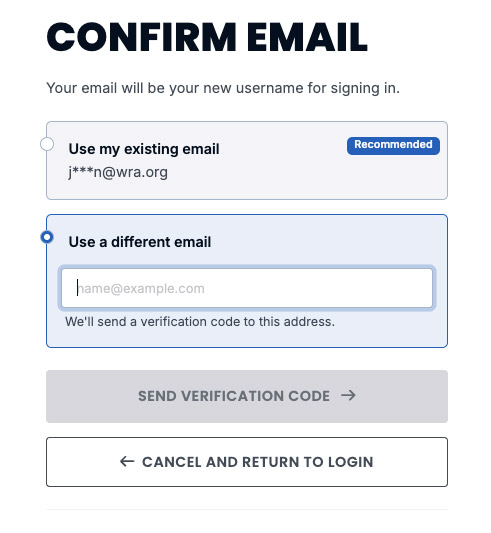
If your current username isn’t an email address, you’ll be prompted to update your username. You can choose to:
Use your existing email address on file.
Or enter a different email address you’d like to use instead.

What happens after I enter my email address?
Once you provide an email, you’ll receive a verification code at that address. Simply enter the code on the website to confirm your identity and complete your first login.

I didn’t receive a verification code. What should I do?
If you don’t see the email within a few minutes, check your spam or junk folder.
If you still can’t find it, click “Resend Code” on the login page or contact the WRA member support team by emailing us at educate@wra.org.
Do I need to go through this process every time I log in?
No. You only need to verify your email once when logging in to the new website for the first time. After you confirm your email, you’ll use it as your username going forward.
What if I no longer have access to the email address on file?
When prompted, you can select “Use a different email” and enter an email address you currently access. You’ll receive a verification code there to set up your new login.
What should I do if I forgot my password?
Click “Forgot Password?” on the login page. Enter your verified email address and if an account exists with that email, a password reset link will be sent to you. Follow the link in your email to create a new, secure password before logging in again.
